
WaySense
FiglioTechParenting
4.21.00 Reviews
- Version
- 1.12.0
- Installs
- 10.00K
- Age Rating
- Everyone
Screenshots
Our Review of WaySense
 Analysis by Appyee
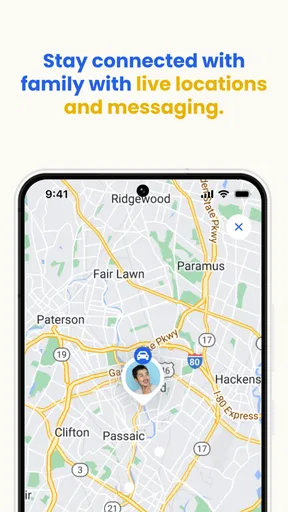
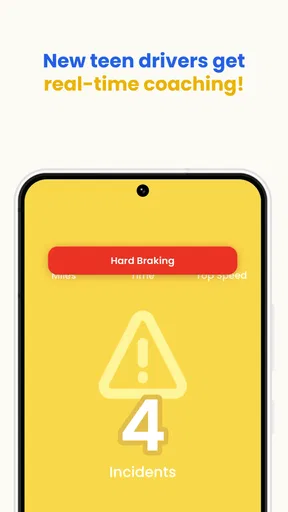
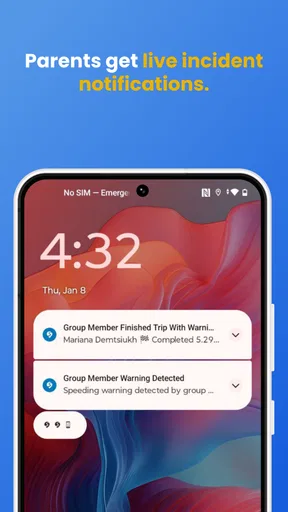
Helping a teenager become a safer driver is difficult because parents usually see only the beginning and end of a trip. WaySense approaches that gap as a parenting app for monitoring, coaching, and protecting teen drivers. Its focus is practical: video evidence and real-time alerts are intended to give a parent more useful context than a simple arrival message.
I see the app as most valuable for families who want to stay involved without sitting beside the driver on every journey. It is free to install, rated for Everyone, and developed by FiglioTech. The current version is 1.12.0, and it runs on operating system version 9 or later. Those details make the starting point fairly accessible, although the experience still depends on how comfortably both parent and teenager accept driving oversight.
The app has reached over ten thousand installs and holds an average rating of 4.2 from around twelve ratings. That is encouraging, but it is also a small public sample, so I would treat the rating as an early signal rather than a final verdict. I would install it because the idea is useful, not because the rating alone proves that every family will find it effortless.
Getting from installation to a useful first trip
I’d treat the first trip as a low-pressure trial, not a test of your teenager’s driving or of the app. Before setting out, agree on what you’ll do if an alert appears and leave any review until the driver is parked; that simple boundary keeps attention on the road and makes the first result easier to discuss.
What to expect before you begin
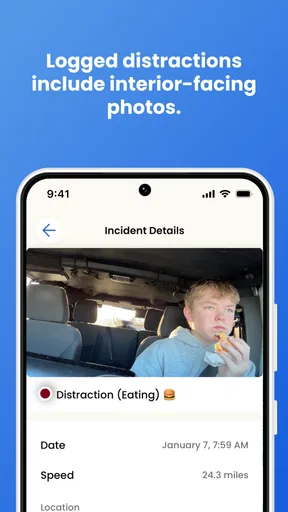
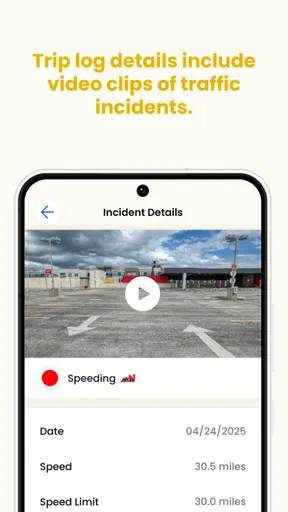
WaySense is not just a digital checklist for driving practice. Its appeal comes from combining coaching and protection in one place. A parent can use the information around a trip to start a calmer conversation about driving behavior, while alerts can draw attention to an event that deserves a closer look. The video evidence matters because it can help replace vague reports with something more concrete.
That does not mean the app should become a substitute for trust, teaching, or direct communication. A teenager may accept safety monitoring more readily when the purpose is explained in advance: the goal is to review risky moments and build better habits, not to search constantly for reasons to punish them. I would make that agreement before the first drive, because the same alert can feel protective to one family and intrusive to another.
For a first-time user, the most useful expectation is modest. The first success is not “I can see everything my teen does.” It is “I received useful context about a drive and knew what to discuss afterward.” That framing keeps the app connected to learning rather than turning it into a source of constant anxiety.
Setting up the family workflow
After installing WaySense, I would begin with the parent and teen roles rather than rushing straight into a trip. Make sure the person responsible for coaching understands what the app is meant to show, and make sure the driver knows how alerts and video evidence will be used. A clear family rule—review the event first, then ask questions—can prevent an automatic accusation based on a notification.
The next practical step is to prepare for a normal journey instead of an unusually complicated one. A short drive to school, a practice route, or a familiar trip to a shop is better than a long holiday journey for the first test. It gives you a manageable situation in which to notice how the app communicates, how quickly you understand an alert, and whether the resulting information is actually helpful.
I would also choose a time when both people can pay attention to setup. The driver should not be configuring anything while the vehicle is moving, and the parent should not wait until an alert arrives to learn what the different pieces of information mean. A few minutes spent agreeing on the workflow can make the first meaningful result much less stressful.
The first meaningful success
A realistic first use might look like this: your teenager drives home after an evening practice session. During the trip, WaySense produces a real-time alert. Instead of immediately calling or sending an emotional message, you wait until the car is parked, review the available video evidence, and ask your teen to describe what happened. Perhaps the event was a rushed maneuver, a distraction, or a situation that looked more serious from the alert than it felt from inside the car.
That sequence is where the app can earn its place. The alert gets your attention, while the evidence gives the later conversation a starting point. I would end the discussion with one specific adjustment for the next drive, such as slowing earlier near a busy junction or putting the phone away before moving. Keeping the coaching point narrow makes the information easier to apply than delivering a long lecture about every possible driving mistake.
This is also a useful test of whether WaySense suits your household. If the information helps you have a calm, specific conversation, the app is doing something beyond ordinary location sharing. If every alert leads to panic, arguments, or constant checking, the problem may not be the driving event itself; the family may need clearer boundaries or a less intrusive monitoring approach.
How video evidence changes the conversation
Video can be more useful than a bare warning because it adds context. A notification may tell you that something deserves attention, but a clip can help you distinguish a genuine coaching opportunity from a moment that only looked concerning in isolation. I would avoid treating a clip as a complete explanation, though. Camera footage has a viewpoint, and it may not capture everything the driver noticed or felt.
That limitation is important when deciding what to do next. Use the evidence to ask open questions rather than announce a verdict. “What happened just before this?” is more productive than “Why were you driving like that?” The app can support a better discussion, but the parent still needs judgment and the teenager still needs a chance to explain.
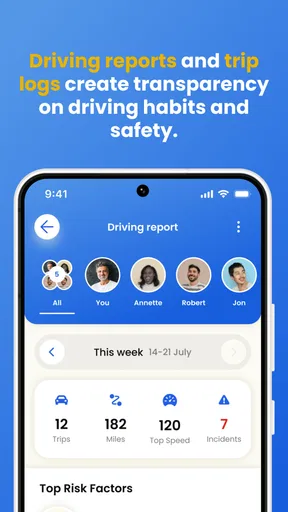
A second useful habit is to review patterns rather than obsess over one isolated notification. One event may be an honest mistake. Several similar events during comparable situations may point to a skill that needs practice. WaySense is therefore more valuable when it becomes part of a regular coaching routine, not when it is used as a live feed that demands attention every minute.
Common confusion during everyday use
The first source of confusion is the difference between an alert and a conclusion. A real-time warning is designed to bring an event to your attention; it is not automatically proof that your teenager acted recklessly. I would wait until the driver is safely stopped before discussing it, then use the video and the driver’s account together.
Another misunderstanding is expecting the app to replace all other family driving rules. WaySense can support monitoring and coaching, but it does not remove the need to agree on phone use, passengers, night driving, route planning, or what happens after a serious incident. Those decisions belong in your family conversation, where they can be explained clearly and adjusted as the driver gains experience.
Parents may also wonder whether the app is appropriate for a teenager who is already a confident driver. I think it can still be useful when the relationship is cooperative and the aim is occasional feedback. It is less suitable when the driver strongly objects to monitoring or when the parent intends to inspect every trip without discussion. In that situation, the technology may create conflict that outweighs its safety benefit.
The financial model deserves attention as well. The app is free, but in-app purchases range from $11.99 to $149.99 per item. I would check the purchase details carefully before committing to anything beyond the free starting point, especially if several family members might use the service. A free installation does not necessarily mean every useful capability remains free, so the cost should be part of the family decision from the beginning.
Where it fits beside familiar alternatives
Many parents begin with ordinary location sharing, phone-based driving modes, or a conversation after the keys are returned. Those options can be simpler and less expensive, particularly for a family that only wants to know whether the teen arrived safely. They may also feel less invasive because they do not place video evidence and real-time alerts at the center of the relationship.
WaySense makes more sense when location alone is not enough. If you want a way to connect an alert with visual context and use that moment for coaching, it offers a more focused approach than a basic map-sharing tool. The trade-off is that the family must be comfortable with a higher level of involvement. More information can improve a conversation, but it can also encourage over-monitoring if the parent checks every detail.
I would choose a simpler alternative for a mature driver who mainly needs emergency contact or arrival confirmation. I would also hesitate if the household has unreliable cooperation around phones and setup, because a safety tool is only useful when everyone follows the agreed process. On the other hand, families in the early learning stage may appreciate having a structured way to turn uncertain driving moments into specific practice goals.
Practical ways to get better results
First, decide what counts as a useful alert before the first trip. If you treat every notification as equally urgent, you will quickly become exhausted and your teenager may stop listening. Agree on which situations require an immediate conversation and which can wait for a weekly review.
Second, keep a small coaching focus. After reviewing an event, choose one behavior to practice on the next drive. This turns WaySense from a record of mistakes into a feedback loop: notice, discuss, practice, and review. That approach is more likely to build independence than repeating the same warning without a concrete action.
Third, use ordinary trips as learning opportunities. A route to school can reveal different challenges from a quiet weekend drive, while a familiar road can show whether a new habit is becoming consistent. You do not need to make every journey feel like an examination. The strongest use of the app is often a short, calm review after a normal trip.
Fourth, protect the driver’s attention. Alerts are valuable only when they do not encourage unsafe phone interaction. The teenager should concentrate on the road, and the parent should avoid demanding an explanation while the vehicle is moving. Review after parking, when both people can think clearly.
Who should use it and who should skip it
I would recommend WaySense to parents of newer teen drivers who want more than a location pin and are willing to coach with patience. It is especially promising for families that can agree on transparent rules for reviewing alerts and video evidence. In that setting, the app can make difficult conversations more specific and less dependent on memory.
I would skip it if your main goal is silent surveillance, if your teenager has not agreed to the monitoring arrangement, or if alerts are likely to trigger immediate punishment. I would also look elsewhere if you only need basic arrival notifications and do not want to manage a more involved safety workflow. A simpler tool may be the better choice when simplicity and privacy matter more than detailed context.
FiglioTech’s app is still a relatively focused parenting product rather than an all-purpose family platform. Its public presence includes over ten thousand installs, and the average rating of 4.2 is based on around twelve ratings, so I would approach it with realistic expectations. It has enough traction to be worth testing, but I would judge it by whether it improves your own family’s driving conversations.
My recommendation after the first week
My advice is to start with the free version, establish the family rules, and test WaySense on a short, familiar route. Do not begin by trying to analyze every trip. Instead, look for one moment where an alert and its video evidence help you understand what happened and agree on a practical improvement.
Before buying any optional item, make sure the app’s actual workflow matches your needs and that everyone understands the ongoing cost. The available purchase range extends from $11.99 to $149.99 per item, which makes it particularly important to consider value rather than assuming that a higher-priced option is automatically necessary.
Overall, I find WaySense most convincing as a coaching aid with protective features, not as a replacement for parenting judgment. It can give a family a clearer starting point after a worrying driving moment, and that is a meaningful advantage over relying on memory or a simple arrival message. Its success depends on restraint: use the information to teach, respect the driver’s attention, and keep the conversation focused.
For a first-time user, the path is reassuringly straightforward in principle: install the app, agree on expectations, try it on a normal trip, wait until the car is parked, and turn the first useful alert into one specific lesson. If that process strengthens trust while improving awareness, WaySense is worth keeping. If it only increases checking and conflict, a simpler alternative will probably serve your family better.
Verdict
Strengths of WaySense
- Clear route guidance with timely alerts for upcoming turns and hazards.
- Useful offline support when mobile coverage is weak or unavailable.
- Simple interface makes essential navigation tools easy to access.
- Can help drivers plan journeys and avoid unnecessary detours.
- Location-based features may improve awareness during unfamiliar trips.
Limitations of WaySense
- Accuracy can vary with outdated maps, GPS issues, or changing road conditions.
- Continuous location tracking may affect battery life during longer journeys.
- Some features may require permissions that raise privacy concerns.
- The app’s usefulness depends on reliable GPS and internet availability.
- Advanced tools or map content may be limited without a paid plan.
Similar Picks in This Category
View All
Family Space
Motorola Mobility LLC.3.9

شرطة الأطفال - مكالمة وهمية
Oub Apps4.1

Findmykids: Parental Control
LETEM LTD4.6

Pregnancy + | Tracker App
Philips Electronics UK Limited4.8

Policía de niños - para padres
Kids police4.7

Pregnancy App
Amila4.9
Frequently Asked Questions
What is WaySense and what can I use it for?
WaySense is designed to help users understand their surroundings and make more informed decisions while moving through different locations. Depending on the available features and your device, it may provide location-based information, navigation assistance, alerts, or contextual guidance. Its usefulness is greatest when location services, notifications, and the required permissions are enabled correctly.
Does WaySense require an internet connection or GPS?
WaySense may rely on GPS, mobile data, Wi-Fi, or a combination of these technologies to deliver accurate location-based results. Some functions might continue working with limited connectivity, but online access is generally recommended for current information, map data, updates, or cloud-based features. Accuracy can also decrease indoors, underground, or in areas with a weak signal.
What permissions does WaySense request, and are they necessary?
WaySense may request access to your location, notifications, motion sensors, Bluetooth, or other device functions depending on the features you use. Location permission is usually important for navigation and context-aware services, while notifications can be needed for timely warnings. Review each request carefully and enable only the permissions you are comfortable granting.
Is WaySense free to download and use?
The download and basic use of WaySense may be free, but certain tools, advanced options, subscriptions, or in-app services could require payment. Before installing, check the application store listing for the current pricing model, trial conditions, and renewal details. If a subscription is offered, confirm how cancellation works through your Android or iOS account.
How accurate and reliable is WaySense in everyday use?
WaySense can be helpful for everyday location-aware tasks, but its performance depends on GPS quality, internet connectivity, device sensors, battery settings, and the accuracy of its underlying data. It should not be treated as a replacement for personal judgment, official instructions, or emergency services. Always verify important information, especially when traveling or navigating unfamiliar areas.
